


Oct.14,2026
Share:
Building a fiber-to-the-home (FTTH) network for 1000 homes is a huge task. Many of our clients struggle with this. They cannot find enough skilled workers to splice the fiber cables on site. This shortage causes long delays. It also makes labor costs very high. We designed a centralized split solution to solve this problem.
A Fiber NID (Network Interface Device) box is the first device on the user side of an FTTH network. It sits on the outside wall of the home. It connects the outdoor drop cable to the indoor fiber. Our NID box has a built-in reel. This reel holds a factory-terminated drop cable. It removes the need for field splicing at the home.
If you are planning an FTTH project, this article explains how our NID box works with the whole system. It also shows you how to save time and money.
To understand the NID box, we must first look at the whole network. We use a centralized split architecture for 1000-home projects. This design puts all signal distribution in one place. It makes the network simpler to manage and maintain.
The network starts at the Central Office (CO) with an OLT. It moves through feeder cables to an FDH. From there, distribution cables connect to MST boxes. Then drop cables run from the MST to the NID box on each home. Finally, the signal goes to the ONT inside the home.
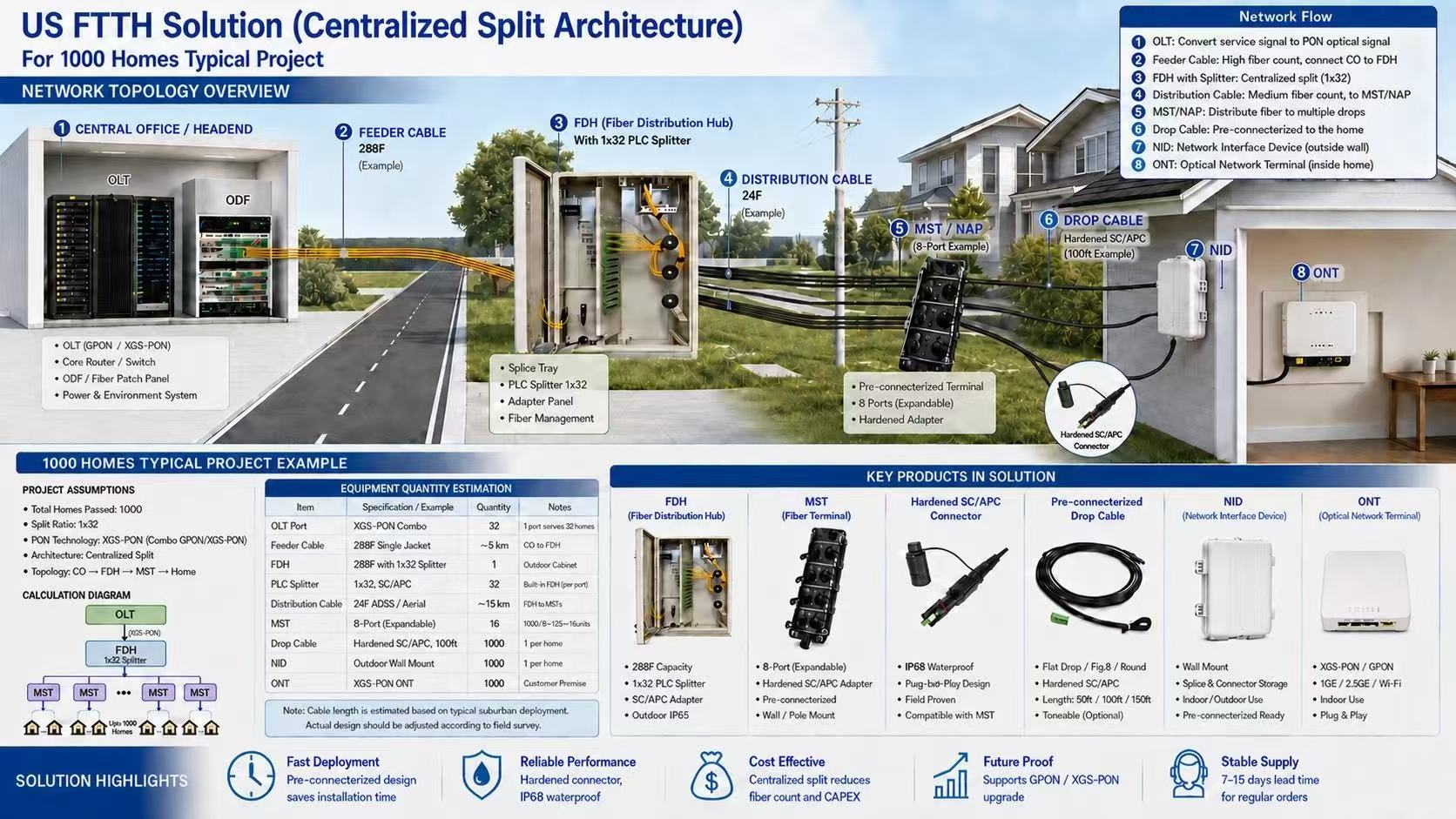
We use a GPON/XGS-PON Combo OLT in the central office. Each PON port connects to a 1:32 splitter. For 1000 homes, we use 32 OLT ports. This setup leaves spare ports for future growth.
The signal travels from the OLT through a 288-fiber feeder cable. This cable is about 5 km long. It connects to a Fiber Distribution Hub (FDH) in the community. The FDH holds the 1x32 PLC splitter. It splits one signal into 32 signals. One FDH is enough for 1000 homes.
From the FDH, a 24-fiber distribution cable carries the signal to the MST boxes. Each MST box has 8 ports. It serves 8 homes. These boxes are usually mounted on utility poles or walls.
The final link is the drop cable. It runs from the MST box to the outside wall of each home. This is where our Fiber NID box comes in.
| Component | Specification | Quantity | Location |
|---|---|---|---|
| OLT | XGS-PON Combo | 32 Ports | Central Office |
| Feeder Cable | 288F Single Jacket | ~5 km | CO to FDH |
| FDH | With 1x32 PLC Splitter | 1 Unit | Outdoor Community |
| Distribution Cable | 24F ADSS/Aerial | ~15 km | FDH to MST |
| MST | 8-Port Pre-terminated | 125 Units | Pole/Wall |
| Drop Cable | SC/APC Pre-connected | 1000 Lines | MST to NID |
| NID | With Built-in Reel | 1000 Units | Outside Wall |
| ONT | XGS-PON | 1000 Units | Inside Home |
The NID box is a small device. But it plays a huge role in the network. It protects the fiber connection. It also manages the extra drop cable.
Our NID box comes with a built-in cable reel. The drop cable is factory-terminated with SC/APC connectors. It is pre-wound inside the reel. Installers just pull the exact length of cable they need. The extra cable stays neatly coiled inside the box. This removes field splicing.

We designed this NID box for faster and cleaner FTTH residential installation. It is compact and easy to mount.
Key Features:
| Parameter | Specification |
|---|---|
| Mounting | Compact Wall-Mount (Outdoor) |
| Built-in Reel | Yes (Up to 150 ft drop cable) |
| Connector Type | Factory-terminated SC/APC |
| Cable Options | Armored or Non-armored |
| Protection | IP55 Outdoor Protection |
| Applications | FTTH/FTTx, Homes, Apartments, Villas, Small Buildings |
| Customization | Custom cable length and connector configurations available |
In traditional FTTH installation, managing the drop cable is a headache. The cable is often too long. Installers must coil the extra cable in a separate storage box. Sometimes they leave an ugly loop on the wall. If the cable is too short, they must splice more cable on site. This requires a splicing machine and a certified technician.
Our NID box solves these problems. Installers just open the box and pull out the cable they need. The extra part stays neatly inside. No field splicing is needed. No expensive tools are needed.
We offer two cable options for the NID box. This helps clients fit different installation environments.
Armored cable has a metal protective layer. It is stronger. It protects the fiber from rodents and heavy pressure. It works well for direct burial or harsh outdoor environments.
Non-armored cable is lighter and more flexible. It is easier to handle. It works well for aerial installations or short conduit runs.
Our NID box uses SC/APC connectors. APC stands for Angled Physical Contact. The end face of the connector has an 8-degree angle. This design gives a very low return loss. APC connectors have a return loss of about -65dB. UPC connectors only have about -50dB. Lower return loss means less signal reflection. This is very important for video and high-speed data in FTTH networks.
The MST (Multiport Service Terminal) box is the bridge between the FDH and the NID box. It connects the distribution cable to the drop cables going to homes. Many clients overlook the MST selection. This causes problems during installation, like not having enough ports or limited mounting spots.
The MST box connects distribution cables and drop cables. Our 8-port MST box comes pre-terminated with an 8-fiber feeder cable. It offers locatable or dielectric cable options. Cable lengths range from 50 to 2000 feet. The ports use hardened SC/APC adapters. Installers do not need to splice anything on site.
Our 8-port MST box is fully terminated at the factory. Every port has a hardened SC/APC adapter. These adapters are environmentally sealed. They handle harsh outdoor conditions very well.
Hardened connector technology is the core strength of this MST series. Factory-terminated connectors ensure consistent quality. They also make field installation very simple. Installers just plug the pre-terminated drop cable from the NID box into the MST port. They do not need to splice. They also do not need to open the terminal again.
The MST box comes with a mounting bracket. It supports pole, pedestal, handhole, or aerial mounting. This flexible design lets the installation team pick the best spot based on site conditions.
| Parameter | Specification |
|---|---|
| Port Count | 8 Ports |
| Port Type | Hardened SC/APC Adapters |
| Feeder Cable | 8-Fiber Pre-terminated |
| Cable Type | Locatable or Dielectric |
| Cable Length | 50 to 2000 Feet Available |
| Fiber Type | Single-mode |
Our MST box offers two feeder cable options: locatable and dielectric. These two cables fit different installation scenarios.
Locatable cable has a metal locating wire inside. When installers bury the cable, they can use locating equipment to track its path. This is very helpful for future maintenance or expansion. Technicians can quickly find the buried cable.
Dielectric cable has no metal parts. It is made of insulating materials. It does not suffer from electromagnetic interference. In areas with frequent lightning or near power lines, dielectric cable is a safer choice.
Traditional MST installation needs field splicing. Installers must splice each fiber from the distribution cable to the MST adapters. Then they connect the drop cables. This process takes a lot of time. It also requires splicing machines and certified technicians.
Our pre-terminated MST moves all this work to the factory. The feeder cable is terminated and sealed inside the MST box before shipping. When installers arrive on site, they just mount the MST box on a pole or pedestal. Then they plug the pre-terminated drop cables into the ports.
According to industry data, using hardened connector MST solutions reduces cable costs by over 85% compared to traditional splicing. It cuts splicing costs by about 70%. The overall cost per home drops by about 19%. These savings come from eliminating splicing work and improving installation speed.
To be honest, the biggest cost in an FTTH project is not the equipment. It is the labor. In the North American market, an experienced splicing technician can cost hundreds of dollars per day. If a 1000-home project needs full field splicing, the splicing cost alone can exceed $40,000.
Our solution moves most splicing work to the factory through pre-terminated designs. Field installation only needs plug-and-play operations. It does not need splicing machines or highly skilled technicians. Installation time drops by over 50%. Labor costs drop by over 70%.
| Cost Item | Traditional Splicing | Pre-terminated Solution | Savings |
|---|---|---|---|
| Splicing Equipment | Needed (~$5,000/unit) | Not Needed | 100% |
| Splicing Labor | High (Certified techs) | Low (Simple training) | ~70% |
| Installation Time | Baseline | 50% Shorter | 50% |
| Rework Rate | Higher | Very Low | - |
Pre-terminated solutions save labor costs in three main ways. First, field splicing is completely removed. In traditional methods, each user terminal needs 2 to 3 splices (MST end, NID end, ONT end). For 1000 homes, that is 2000 to 3000 splice operations. In our solution, the factory does all of this.
Second, the skill requirement for installers is lower. Pre-terminated drop cables just plug into SC/APC adapters. Regular workers can do this after a simple training. You do not need to hire specialized splicing technicians. You also do not need expensive splicing machines.
Third, installation speed increases. According to industry data, pre-terminated solutions cut installation time by 34% to 45%. This means the same crew can install more homes every day.
Clients often worry about one thing. If they deploy GPON now, will they need to replace all equipment to upgrade to XGS-PON later?
No. We designed this solution for smooth evolution to next-generation PON technology. The OLT uses XGS-PON Combo technology. It supports both GPON and XGS-PON standards at the same time. The splitters in the FDH, the MST boxes, the drop cables, and the NID boxes are all fully compatible with both standards.
GPON has a downstream rate of 2.5Gbps and an upstream rate of 1.25Gbps. XGS-PON has 10Gbps for both downstream and upstream. Both can coexist on the same fiber. They use wavelength division multiplexing for a smooth transition.
The upgrade process is very simple. You add XGS-PON ports or replace OLT boards in the central office. Then you swap the user's ONT for an XGS-PON model. The outdoor cables, splitters, MST boxes, and NID boxes do not need any changes.
For operators, this means one deployment meets bandwidth needs for over 10 years. It avoids repeated investments.
Alteoptic is a B2B company based in China. We have warehouses in Hong Kong and Shenzhen. We ship to North America, Europe, Canada, Dubai, and the UAE.
We serve large company buyers and network builders. We understand the need for reliable hardware and fast delivery.
For this FTTH solution, we offer:
If you are purchasing NID boxes, MST boxes, or pre-terminated drop cables for upcoming projects, we can send you datasheets, samples, and quotations for evaluation.
The Fiber NID box is a small device, but it plays a big role in FTTH deployment. Our NID box with a built-in reel solves the biggest problems in field installation. It removes field splicing. It manages extra cable neatly. It shortens installation time by over 50%.
When you combine this NID box with our centralized split architecture, you get a complete solution for 1000-home projects. From the OLT to the ONT, we use pre-terminated designs. We keep the hard work in the factory. We leave the simple plug-and-play work for the field.
If you want to learn more about this solution, please contact us. We are ready to help you with your next project.
YOUR VACATION IS HERE
Prepare your network for seamless 5G deployment. Get direct access to factory pricing, custom OEM/0DM solutions, and rapid prototyping,
Let's Build Your Optical Network, Kindly have a chat with our sales experts!
Get A Free Quote
Related Products

Alteoptic S8 side-open fiber thermal stripping pliers feature premium craftsmanship and stable performance. It quickly melts and removes the outer plastic sheath of optical fibers while effectively protecting the internal fiber core from damage. This professional design greatly improves stripping efficiency and ensures excellent fiber quality, making it ideal for reliable optical fiber construction and maintenance.
View More
CFS-2 Two Port Cable Stripper FTTH Fiber Fusion Splicing Tool Bare Fiber Leather Fiber Stripper
CFS-2 is a dual port cable stripper designed specifically for FTTH fiber fusion splicing. It precisely peels off the outer protective jacket and buffer layer of the fiber optic cable. Made of high-quality materials, easy to use, ensuring that the optical fiber is not damaged. The ergonomic handle design provides a comfortable grip and reduces fatigue.
View More
Alteoptic's affordable single head armored fiber optic cable cutter is a stripping tool with a diameter range of 8-28.6mm, which can horizontally and vertically cut fiber optic cables for easy stripping.
View More
Alteoptic's affordable single head armored fiber optic cable cutter is a stripping tool with a diameter range of 4-10mm, which can horizontally and vertically cut fiber optic cables for easy stripping.
View More
The fiber tool loose tube slitting machine is designed specifically for loose tubes with an outer diameter of 1.5-3.3mm. This longitudinal cutter effortlessly peels off the external protective material of the fiber optic central bundle tube. Made of leather, comfortable and durable, ensuring precise and efficient peeling. Whether it's fiber optic installation or maintenance, this loose tube slitting machine is a valuable assistant for professionals.
View More
The Mid-Span Access Tool AUA-05 is designed for cables ranging from 1.9-3.0mm, featuring efficient longitudinal cable cutting. It is ideal for stripping loose-tube armored fiber cables and is available in three colors, offering easy handling for fiber optic installation and maintenance tasks.
View More
8-Port Gel-Sealed Fiber Optic Splice and Patch Closure with SC/APC Adapters
AT01135 Fiber Optic Splice Closure is a wiring line device of user distributions in FTTH system, it provides protection and management for fiber cable, and be used for terminating, cable branching, cross connection.It is mainly used for user access point in FTTH-ODN network , it can be divided into indoor and outdoor type according to the installation scenario, and can be divided into distribution type and optic-split type according to thefunction.AT01135 is used as a termination point for the feeder cable to connect with drop cable in FTTx communication network system. The fiber splicing, splitting, and distribution can be done in this box, and meanwhile it provides solid protection and management for FTTx network building.
View More
10 wavelengths,500 sets of data storage and cyclic overlay, Two types of connectors can be replaced 2.5 mm universal connector for SC/FC/ST/LC (optional)
View More
Support replacement interface, 2.5mm universal interface,Standard Suitable for SC/FC/ST connectors, There is continuous wave output,And comes with 3 modulation frequencies
View More
Automatic switch-off after10 minutes of standby,Stable and powerful light source, strong penetration.and LED for easy line inspection and construction in dark environments
View More